How to enter the Opel / Vauxhall radio code
On most Opel and Vauxhall radios the preset buttons set the code digits – press 1 until the first digit is right, then 2, 3 and 4 – and you confirm with the button described in the manual. Details for each radio maker are in how to enter a radio code. After wrong codes the radio waits before it accepts a new one (locked radio).
Finding the serial
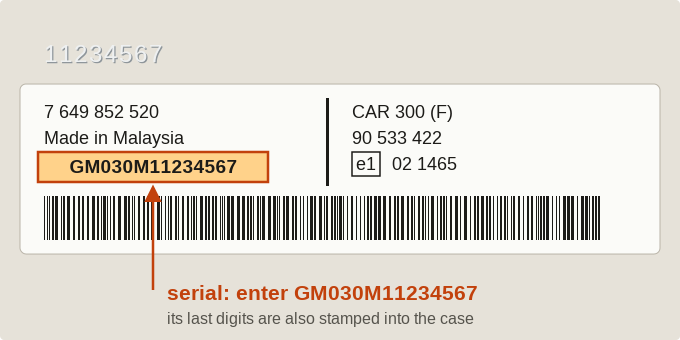
Before removing the radio, look for the radio code card in the owner’s wallet – it often has the code already. Otherwise the radio comes out with release keys and the serial is on the label on the case. Full walkthrough: how to find your radio serial number.
Which Opel / Vauxhall radios are covered
All of these are recognised automatically from the full serial:
- Blaupunkt – BP + 4 digits + 1 character + 7 digits (e.g. BP0302A1234567).
- Delco – GM1500… or GM0205… (e.g. GM1500Y0123456).
- Grundig and Philips – the other GM serials: Grundig (GM0303…, GM0200…) and Philips – CAR 400, CCR 600, CCR 800, SC 201, SC 804 and more (GM0400…, GM0201…, GM0670…). Both lists are checked automatically.
- Blaupunkt CAR 300 – GM030M…, GM0300… or GM1300… (e.g. GM030MW5213677).
- Blaupunkt models recognised from the GM0203… serial, for example: CAR2003, CAR2003 (F) without display.