How to enter the Renault radio code
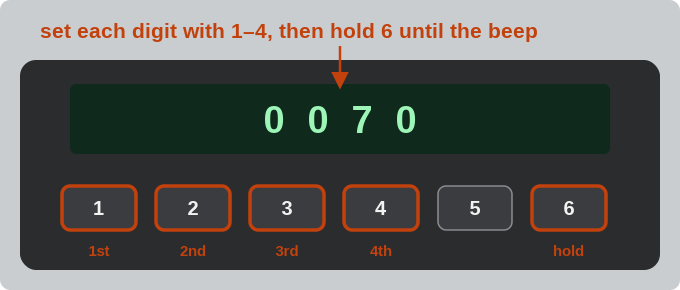
- Switch the radio on. The display shows CODE or 0000.
- Press 1 until the first digit is right, then 2, 3 and 4 for the other digits.
- Press and hold 6 until you hear a beep.
Radio with a remote control behind the steering wheel? Turn the wheel on the remote to set the first digit, then press the button on the bottom of the remote to confirm it. Set the other three digits the same way, then press and hold that button until you hear a beep.
Countdown or code entry blocked? Each wrong code makes the radio wait longer before the next try. Leave the radio on until it asks for the code again, then enter it once, carefully – see what to do when a radio is locked.
How to find the pre-code without removing the radio
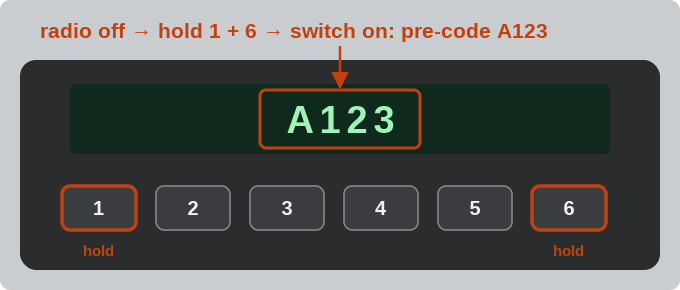
- Switch the radio off.
- Press and hold preset buttons 1 and 6 at the same time.
- While still holding them, switch the radio on.
- Wait a few seconds: the display shows the pre-code, e.g. A123.
If nothing appears, the pre-code is also printed on the label on the radio case, next to the word SECURITY – for example A123-SECURITY. That is why it is often called the security code. It is not the 4-digit code you enter in the radio: type the letter and three digits here and you get that code. More options are in our serial number guide.
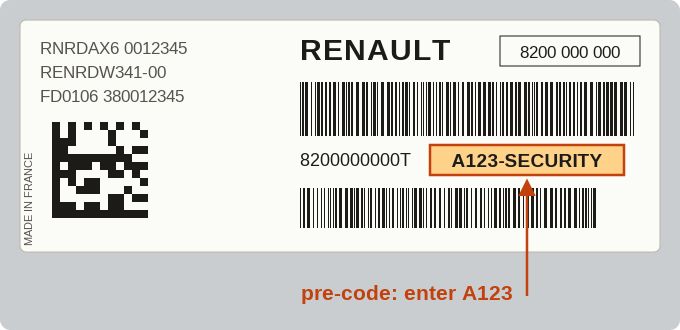
For example, the pre-code A100 gives the code 0070.
Pre-code not showing?
- Start with the radio off. Press 1 and 6 first, then switch the radio on while you keep both buttons pressed.
- Keep holding for a few seconds. The display may show CODE or 0000 first and the pre-code after it.
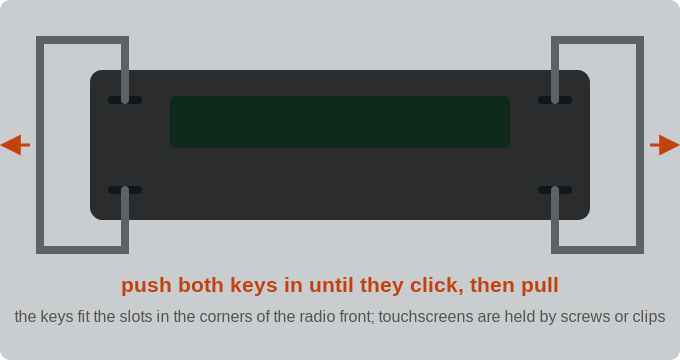
- Still nothing? Read the pre-code from the label on the radio case. You need two radio removal keys to slide the radio out.
- Touchscreen in the dashboard? Media-Nav, R-Link and Carminat units have no pre-code – for Media-Nav get the code by VIN, for the others send us the details.
- No pre-code on the display or the label? Send us the VIN instead – see below.
No pre-code? Send us the VIN
If your radio shows no pre-code with buttons 1 and 6 and there is none on the label – this happens with some newer radios, for example units made by LG or Humax – send us the car’s VIN (17 characters) on the Renault code by VIN page: free, the code by email within 24–72 hours (priority handling: 4.99 €).
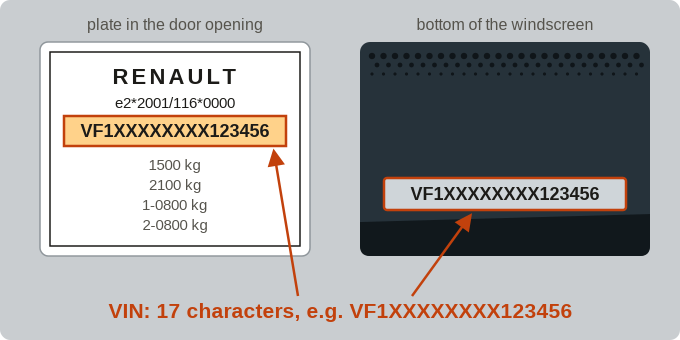
The VIN is on the registration document (field E), on the manufacturer’s plate in the door opening and at the bottom of the windscreen:
Renault models with a pre-code radio
Most Renault models from the late 1990s to the mid-2010s have a radio with a one-line display, six preset buttons and a pre-code, including:
Which Renault radios are covered
- Update List, Tuner List, CD Player and Radiosat and most Renault radios from the late 1990s to the mid-2010s – pre-code (letter + 3 digits, e.g. A123). The same pre-code is used by Dacia and the Mercedes-Benz Citan, so you may be asked to confirm Renault / Dacia.
- Older Blaupunkt-made Renault radios – BP serial on the label (14 characters, e.g. BP3305A1234567), recognised automatically.
- Philips-made Renault radios – Radiosat 4000, 6000 and 6010 and other Philips units with a serial starting RN (14 characters, e.g. RN579FS1234567), recognised automatically.
- Renault trucks (Magnum and others) with a Delphi radio – serial starting with 89F, code shown instantly: see Renault Trucks radio code.
- Newer radios without a pre-code (for example made by LG or Humax) – send us the VIN on the Renault code by VIN page: free, the code by email within 24–72 hours (priority handling: 4.99 €).
- Blaupunkt models recognised from the BP… serial, for example: G4 (A), G4 (B), G4 (C), G4 (D), G4 (F), G5 (B) RDS, HO Clio, HO RDS, HO RDS Twingo, Mono CD H3 RDS, RDS 24v, Twingo.
Media-Nav, R-Link and newer touchscreens do not use these codes – for Media-Nav get the code by VIN, for the others send us the details and our team will help.