1. Home
  2. Radio code calculator
  3. Ford

Ford radio code

To get a Ford radio code, find the serial on the radio label or display – usually M or V followed by 6 digits, e.g. V384127 – type it below and the 4-digit code is shown instantly.

Updated · Reviewed by the GetRadioCode team

Find your radio code

Free · instant · no sign-up
Where do I find my serial number?
  • Ford: M123456 · V123456
  • Blaupunkt / Bosch: BP3305A1234567 · CM6697X1234567
  • Renault / Dacia: pre-code such as A123 (hold 1 + 6 at switch-on)
  • Chrysler / Jeep: TM9205901394 · T00BE123456789
  • Mercedes Audio 10: AL2910X1202553
  • Toyota / Lexus: 16-character ERC shown on the screen

It is printed on a label on the radio case; some radios show it on the display. Typical serials: Step-by-step guide →

Your code ————

We recognise the radio and its brand from the serial and find the right code for you.

Free – up to 5 different serials every 24 hours. Only for a radio you own; check the serial before entering the code.

Choose your radio type yourself

Ford radio codes

Free · instant · no sign-up

Type the serial from the label: M and 6 digits (M123456).

Your code ————

Free – up to 5 different serials every 24 hours. Only for a radio you own; check the serial before entering the code.

Ford radio code by model

What the serial looks like

  • Ford M seriesM123456
  • Ford V series (6000 CD, Sony)V123456
  • Ford Sony (longer label)SOCD6X7V123456
  • Ford M (longer label)FDC2005M123456
  • Ford L / C seriesL123456
  • Travelpilot (C7E3A / C7E3F)C7E3A0517X8391693
  • Travelpilot 132 (BP…)BP050033103143

Type the whole serial as printed – the radio type is recognised automatically.

How to enter the Ford radio code

  1. Switch the ignition to accessory and turn the radio on. It shows CODE or KEYCODE.
  2. Press preset 1 until the first digit of your code appears. Use 2, 3 and 4 for the other digits.
  3. Press (or hold) 5 to confirm. The radio starts playing.
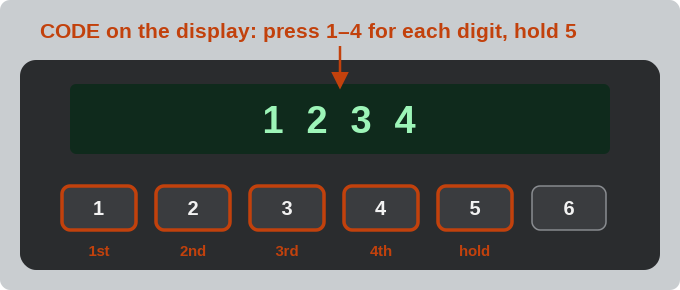
Drawing: entering the code on a Ford radio – buttons 1 to 4 set the four digits, then hold button 5
Buttons 1–4 set the four digits, a long press on 5 confirms (our drawing).

WAIT, LOCKED 10 or LOCKED 13? Do not keep trying random codes. WAIT after a wrong code: leave the radio and ignition on (about 30 minutes) until CODE appears again. LOCKED 10 after 10 wrong codes: on many models, hold button 6 while switching the radio on to get three more attempts – use them only with the correct code. LOCKED 13 means all attempts are used up and the radio has to be reprogrammed by a specialist. More in what to do when a radio is locked.

Where to find the Ford radio serial number

  • On the display (6000 CD and most V series). Switch the radio off, hold presets 1 and 6 and switch it on – the serial (V…) scrolls past. On 4500 RDS radios use 2 and 6. Film the screen with your phone if it goes by too fast.
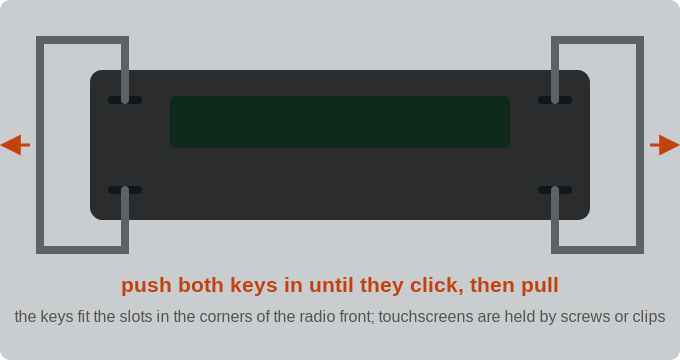
  • On the radio label. Remove the radio with a pair of Ford radio removal keys (the U-shaped tools that slide into the holes on the front panel). The serial is on a white sticker on the top or side of the case, next to the barcode.
  • In the owner’s pack. Ford supplied the code on a small keycode card – check the service book first.
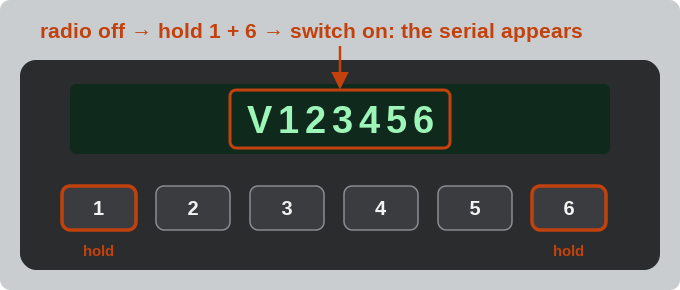
Drawing of a Ford radio showing its serial V123456 on the display after holding buttons 1 and 6 at switch-on
Radio off, hold 1 and 6, switch on: the serial appears on the display (our drawing).
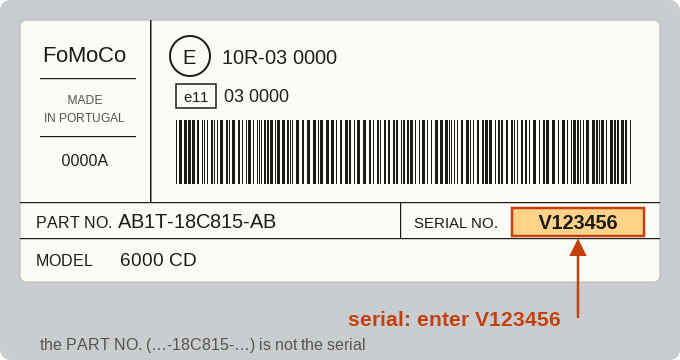
Drawing of a Ford radio label: the serial is printed after SERIAL NO., e.g. V123456; the PART NO. is not the serial
Where the serial is on a Ford radio label (our drawing, numbers made up). Enter the V and the 6 digits, here V123456.
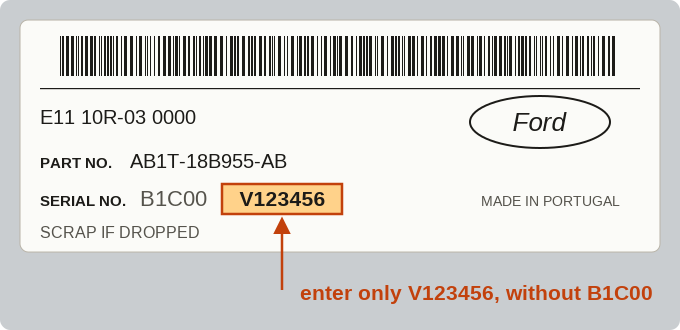
Drawing of a Ford label with a prefix before the serial: SERIAL NO. B1C00 V123456 – enter only V123456
Some Ford labels print a short prefix before the serial (our drawing). Enter only the V and the 6 digits.
Drawing: two U-shaped radio removal keys pushed into the slots on both sides of the radio front, then the radio is pulled out
Two removal keys go into the slots on the radio front until they click; then pull the radio out by the keys (our drawing).

Full walkthrough: how to find your radio serial number.

Which Ford radios are covered

All of these are recognised automatically from the full serial – no need to choose a calculator:

  • M series – M + 6 digits (M123456): most 4500 RDS and older cassette radios, early 6000 CD. Also printed inside a longer number, e.g. FDC2005M123456.
  • V series – V + 6 digits (V123456): 6000 CD and later CD radios. Sony radios may print it as SOCD6X7V123456.
  • L and C series – L or C + 6 digits. C series radios get a 4-digit and a 3-digit code – use the one your radio asks for.
  • Travelpilot navigation (Blaupunkt) – C7E3A…, C7E3F… or a BP serial such as BP050033103143.
  • Philips radios in Australian and Asian Fords (e.g. Falcon, Laser) – serial FO600…, FO666… or FO667… (14 characters).

Only digits on the label, or you typed only the 6 digits? Choose the letter in front of them when asked – M and V radios use different methods. A number like 7S7T-18C815-AA is the Ford part number, not the serial: the serial is on the same label, usually under the barcode. Ford SYNC 2 and SYNC 3 touchscreen systems do not use a 4-digit radio code.

Other Ford radios – Top Power, FMS (Sanyo, 12-digit serial), FIC / North American and Figo (VC0AK…): type the full serial too. If it is not recognised, open Choose your radio type yourself above, or send us the serial and our team will look it up.

Frequently asked questions

What is the Ford keycode?

The keycode is Ford's name for the 4-digit radio code (also called the car stereo code). It was printed on a small card in the owner's pack. If the card is lost, type the radio serial (M or V + 6 digits) above and get the same code.

Can I get my Ford radio code from the registration number or VIN?

No. The code belongs to the radio, not to the car, so it is worked out from the radio serial (M or V + 6 digits). Only a Ford dealer can sometimes find it from the VIN, with proof of ownership. The quickest way is to read the serial – often it can be shown on the display with buttons 1 and 6.

How do I find my Ford radio serial number?

It is printed on a white label on the radio case, starting with M or V followed by 6 digits (e.g. M123456 or V123456). On many V series radios you can also see it on the display: switch the radio off, press and hold buttons 1 and 6, then switch it on.

What is the difference between Ford M and V series?

They are two generations of Ford radio security. M series codes can be calculated from the serial with a formula; V series codes cannot, so they are looked up in a database. You do not need to choose: type the whole serial and the right method is used automatically.

My Ford radio says LOCKED 10 – what now?

LOCKED 10 means a wrong code was entered 10 times. On many Ford radios you get three more attempts: with the radio off, hold button 6 and switch the radio on. Use them only with the correct code – after 13 wrong codes the radio shows LOCKED 13 and can no longer be unlocked with a code (it has to be reprogrammed by an auto-electronics specialist or a Ford dealer).

My Ford radio says WAIT – what now?

A wrong code was entered and the radio blocks new attempts for a while. Leave the radio and ignition on (with the engine running to protect the battery) for about 30 minutes, until CODE appears again, then enter the correct code once.

How do I enter the code on a Ford radio?

On most Ford radios, press preset button 1 until the first digit is correct, button 2 for the second digit, 3 for the third and 4 for the fourth, then press 5 (or hold it) to confirm.

Is the Ford radio code free?

Yes. Codes from this page are free – it works like a Ford radio code generator, without sign-up. If your serial is not found, you can ask our team to look it up.