Car radio code in seconds
Type the serial from your radio label – we recognise the radio and show the code. Free, no sign-up.
Where do I find my serial number?
- Ford:
M123456 · V123456 - Blaupunkt / Bosch:
BP3305A1234567 · CM6697X1234567 - Renault / Dacia:
pre-code such as A123 (hold 1 + 6 at switch-on) - Chrysler / Jeep:
TM9205901394 · T00BE123456789 - Mercedes Audio 10:
AL2910X1202553 - Toyota / Lexus:
16-character ERC shown on the screen
It is printed on a label on the radio case; some radios show it on the display. Typical serials: Step-by-step guide →
Example: M560914 → 5784 (Ford M series)
Tried it on the radio? Did the code work?
Great – enjoy your music!
Sorry about that. These usually help:
Got your code? Help other drivers find us:
A short review on Trustpilot helps other drivers – good or bad, we read every one:
Know your radio type? Choose it from the list →
Up to 5 serials every 24 hours · only for a radio you own.
- Code in seconds
- No sign-up
- Stays private
- Human help
Skip the dealer. Dealers and other code sites usually charge £15–£60 and may ask you to book a visit. Here the code is on your screen in seconds.
Find your brand
No brand found. We can still help – send us a request →
Popular brands
All brands A–Z ↓All car brands A–Z
Radio manufacturers
How it works
- 1Find the serial number
It is on the radio label – usually a white sticker on the radio case. Some radios show it on the screen.
- 2Type it in the box above
We recognise the radio and show the code. If you prefer, choose your brand and radio type from the list.
- 3Enter the code on the radio
Use the preset buttons to type the code in – our step-by-step guide covers the most common radios.
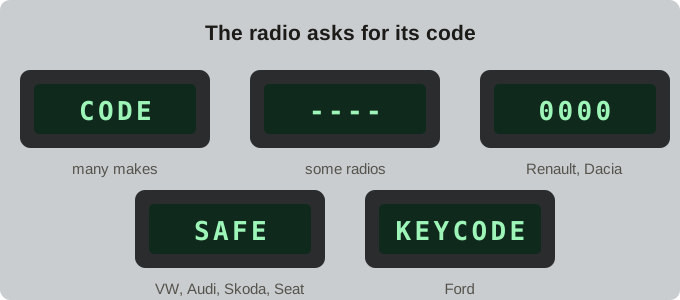
Is your radio asking for a code?
After a flat or disconnected battery many radios show one of these messages and stay silent until the code is entered. Type the serial from the radio label in the box above to get the code.
Why GetRadioCode
Most radio code sites send you straight to a payment form. We do it the other way round: if your radio can be calculated, you get the code for free, instantly and without an account. Your serial number is used only to calculate the code – we do not link it to you. See which radios our radio code calculator works for.
For the radios that no algorithm or database covers yet – for example many newer Volkswagen RCD radios, or newer Nissan units not made by Blaupunkt – you can send the serial to our team and we will find the code for you.
Your radio, your code. Radio codes are an anti-theft feature. Please only use GetRadioCode for a radio you own or are authorised to use.
Guides
Where the car radio serial number is and how to read it: on the label, on the display (Ford, Renault, Audi) or on the code card. Examples for every brand.
Radio locked after too many wrong codes – what to doRadio shows LOCKED, LOCKED 10, SAFE or WAIT after wrong codes? Here is how the lockout works and how to get the radio to accept the code again.
How to enter a car radio codeHow to type the unlock code into your car radio with the preset buttons, with the exact steps for Ford, Renault, Blaupunkt, Becker and other radios.
Frequently asked questions
How do I get my car radio code for free?
Find the serial number on the radio label (or on the display for some models), and type it in the box above – we recognise the radio and its brand. If your radio is covered, the code appears instantly and costs nothing.
Where is the radio serial number?
On most radios it is printed on a white sticker on the top or side of the radio case, so the radio has to be taken out of the dashboard. Some Ford, Renault and Audi radios can show it on the display. See our serial number guide.
Why does my car radio ask for a code?
The code is an anti-theft feature. The radio asks for it whenever it loses power – after a flat or disconnected battery, a battery change or work on the electrics.
What if my radio is locked after too many wrong codes?
Most radios block entry for a while (often shown as LOCKED, SAFE or WAIT). Leave the radio switched on with the ignition on until the timer ends, then enter the correct code. See how to unlock a locked radio.
Is it legal to use a radio code calculator?
Yes, for a radio you own or are authorised to use. Radio codes exist to stop thieves from using stolen radios, so only use our tools for your own radio.