1. Home
  2. Radio code calculator
  3. Audi

Audi radio code

Type the 14-character serial from the radio label – it starts with AUZ (e.g. AUZ6Z2A1234567). Our list holds over 250,000 Audi codes: if your radio is in it, the code appears instantly and free; if not, our team can look it up.

Updated · Reviewed by the GetRadioCode team

Find your radio code

Free · instant · no sign-up
Where do I find my serial number?
  • Ford: M123456 · V123456
  • Blaupunkt / Bosch: BP3305A1234567 · CM6697X1234567
  • Renault / Dacia: pre-code such as A123 (hold 1 + 6 at switch-on)
  • Chrysler / Jeep: TM9205901394 · T00BE123456789
  • Mercedes Audio 10: AL2910X1202553
  • Toyota / Lexus: 16-character ERC shown on the screen

It is printed on a label on the radio case; some radios show it on the display. Typical serials: Step-by-step guide →

Your code ————

We recognise the radio and its brand from the serial and find the right code for you.

Free – up to 5 different serials every 24 hours. Only for a radio you own; check the serial before entering the code.

Choose your radio type yourself

Audi radio codes

Free · instant · no sign-up

Enter the full 14-character serial from the label, starting with VWZ, AUZ, SEZ or SKZ (e.g. VWZ2Z2W1234567).

Your code ————

Free – up to 5 different serials every 24 hours. Only for a radio you own; check the serial before entering the code.

What the serial looks like

  • Audi radio labelAUZ6Z2A1234567

Type the whole serial as printed – the radio type is recognised automatically.

Audi radio serials

Serial starts with Example How to get the code
AUZ6Z2…, AUZ2Z3… and the other AUZ… serials in our list AUZ6Z2A1234567 type it above – code shown instantly
AUZ… serials not in the list AUZ1Z4A1234567 order the code – 24.99 €, within 24 hours
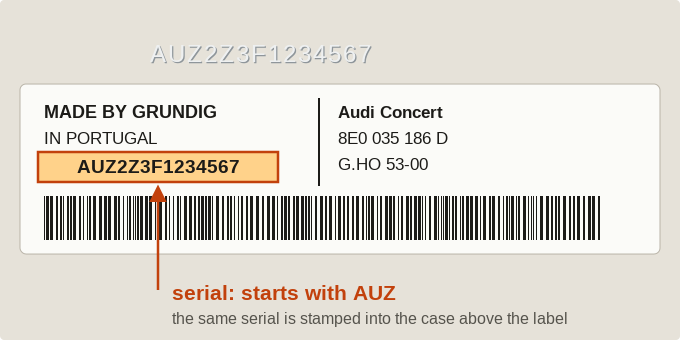
Drawing of an Audi radio label: the serial AUZ2Z3F1234567 is printed on the label and stamped into the metal case above it
Audi radio label (our drawing, numbers made up): the serial starts with AUZ and is also stamped into the case above the label.

Entering an Audi radio code

On Concert, Chorus and Symphony radios, hold TP and RDS together until 1000 shows, then let go (on some radios the pair is AS + RDS, FM2 + RDS or P.Scan + RBDS). Set the digits with presets 1, 2, 3 and 4 – each press raises that digit. Then hold the same two buttons again until SAFE shows and let go. Do not press them before the code is set – the radio would take 1000 as the code. Units with an MMI screen: type the code on the screen. If the display shows SAFE and nothing happens, read locked radio.

Frequently asked questions

How do I see the Audi radio serial without removing the radio?

On the label on the radio case (AUZ…, often also stamped into the metal) and usually on the Radio Card kept with the owner's manual. Some units can show it on the display, but the buttons differ by model – check the owner's manual.

My Audi radio says SAFE. What does that mean?

SAFE means the radio is waiting for its code, or is blocked after wrong codes. If it stays on SAFE and does not accept input, leave the radio on with the ignition on for about an hour until it asks for the code again.

Why is my Audi serial not found?

Audi codes cannot be calculated from the serial – they come from code lists, and no list has every radio. Ours is strongest for AUZ6Z2… and AUZ2Z3… serials. Check the serial character by character, then order the code from our team – 24.99 €, within 24 hours.