1. Home
  2. Radio code calculator
  3. Fiat
  4. Fiat Continental (VP1 / VP2)

Fiat Continental radio code (VP1 / VP2)

Type or scan the A2C… serial from the radio label – the code is shown instantly. If the serial ends in letters, you only say whether the label reads Mexico or Hungary; A3C… and the Ducato 8.4" (TF…) are recognised automatically.

Updated · Reviewed by the GetRadioCode team

Find your radio code

Free · instant · no sign-up
Where do I find my serial number?
  • Ford: M123456 · V123456
  • Blaupunkt / Bosch: BP3305A1234567 · CM6697X1234567
  • Renault / Dacia: pre-code such as A123 (hold 1 + 6 at switch-on)
  • Chrysler / Jeep: TM9205901394 · T00BE123456789
  • Mercedes Audio 10: AL2910X1202553
  • Toyota / Lexus: 16-character ERC shown on the screen

It is printed on a label on the radio case; some radios show it on the display. Typical serials: Step-by-step guide →

Your code ————

We recognise the radio and its brand from the serial and find the right code for you.

Free – up to 5 different serials every 24 hours. Only for a radio you own; check the serial before entering the code.

Want to choose the calculator yourself? Use the quick calculator

Choose your radio type yourself

Fiat Continental (VP1 / VP2) radio codes

Free · instant · no sign-up

Type the whole long serial, A2C… or TF… A2C1234567890123 – not the 5-digit S/N in the MOPAR box.

Your code ————

Free – up to 5 different serials every 24 hours. Only for a radio you own; check the serial before entering the code.

What the serial looks like

  • Continental label – serial starting A2C (illustration)A2C1234567890004567

Type the whole serial as printed – the radio type is recognised automatically.

Which number is the serial

The Continental label has two numbers that look like serials. The right one is the long number under CONTINENTAL, starting with A2C – type it whole in the box above. The short 5-digit S/N in the MOPAR box is not used for the code.

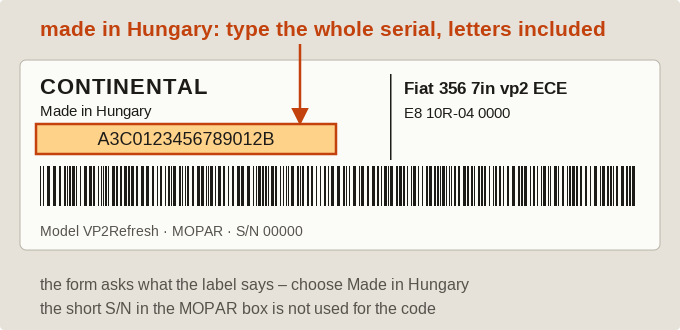
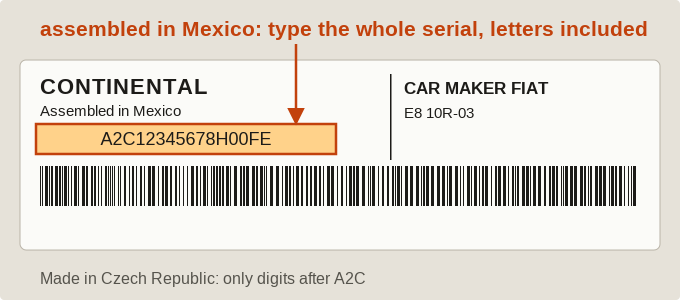
Radios assembled in Mexico have a shorter serial that can end in letters, e.g. A2C12345678H00FE; radios made in Hungary have a serial that starts with A2C or A3C and can also end in letters, e.g. A3C0123456789012B. Type the serial whole, letters included, and check what the label says – the box above asks for it and does the rest.

The model line on the label names the car by its Fiat project number, for example Fiat 312 VP1 (Fiat 500), Fiat 250 VP1 DAB or Fiat 250 VP2 (Ducato), Fiat 263 (Doblò) or Fiat 356 (Tipo). Whatever the model line says, the serial to type is the A2C… (or A3C…) number.

Newer VP2 units – the 8.4-inch radio of the Fiat 250 (Ducato), label “Model: VP2RFP”, Continental Automotive GmbH – have no A2C number: their serial is printed as S/N TF… – TF + 12 digits, e.g. TF012345678901. Type it the same way.
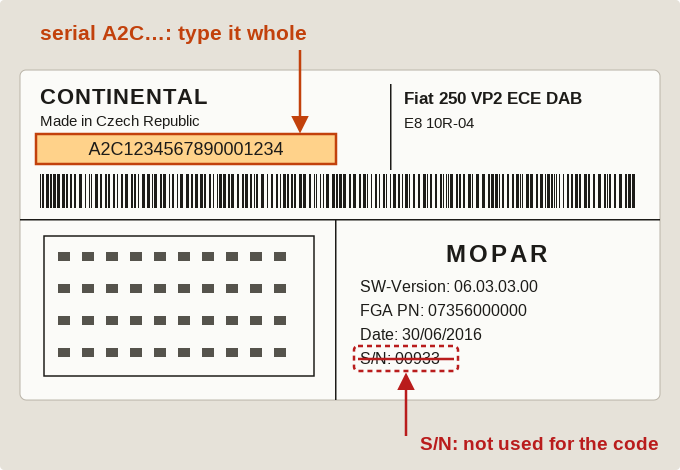
Drawing of a Continental VP1 / VP2 radio label for Fiat: the serial is the long number under CONTINENTAL, for example A2C1234567890001234; the 5-digit S/N in the MOPAR box is not used
Continental VP1 / VP2 label (our drawing, numbers made up): type the whole A2C… serial.
Drawing of a Continental radio label assembled in Mexico: the serial A2C12345678H00FE ends in letters – type it whole, letters included
Continental label assembled in Mexico (our drawing, numbers made up): type the whole serial, letters included.
Drawing of a Continental radio label made in Hungary: the serial starts with A2C or A3C and can end in letters, e.g. A3C0123456789012B – type it whole
Continental label made in Hungary (our drawing, numbers made up): type the whole A2C… or A3C… serial, letters included.

Where was your radio made?

The label says Serial
Made in Czech Republic A2C + 16 digits
Assembled in Mexico A2C… that can end in letters, e.g. …H00FE
Made in Hungary A2C… or A3C… that can end in letters, e.g. …012B
Model: VP2RFP (Ducato 8.4”) S/N TF + 12 digits

Want to choose the calculator yourself? Open Choose your radio type yourself under the box above, pick Fiat Continental VP1 / VP2 (Czech Republic), Fiat VP2 version 2 (Mexico) or Fiat VP2 (Continental, Hungary) and type the whole serial.

Small 7-inch label without “Made in”? See 7-inch radios with a small label below – the code comes from the board.

7-inch radios with a small label

Some 7-inch radios – for example the Fiat 500 (312) – have only a small label that reads like CONTINENTAL Fiat VP2 312 7in EMEA DAB NAV, with no “Made in …” line. The A2C… or A3C… serial on that label does not give the code: a code calculated from it is refused by the radio.
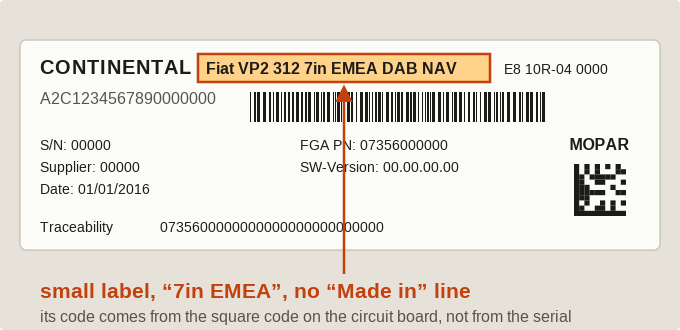
Drawing of the small Continental label of a 7-inch Fiat radio: CONTINENTAL Fiat VP2 312 7in EMEA DAB NAV, no Made in line – the code comes from the square code on the circuit board
The small label of a 7-inch EMEA radio (our drawing, numbers made up): no "Made in" line – the serial on it does not give the code.

For these radios the code comes from the square code (Data Matrix) on the circuit board:

  1. Take the radio out and remove its back cover (a few Torx screws).
  2. In the corner of the board, next to a small chip, find the square code with 312 7inch and VP2 DB printed beside it.
  3. Open Fiat VP2 7in EMEA (code from the board) under Choose your radio type yourself above and tap the camera button in its box: hold the phone over the square code – its number is read into the box. (A QR / Data Matrix reader app works too: type its whole number.)
  4. Press Calculate code – the code is calculated straight away.
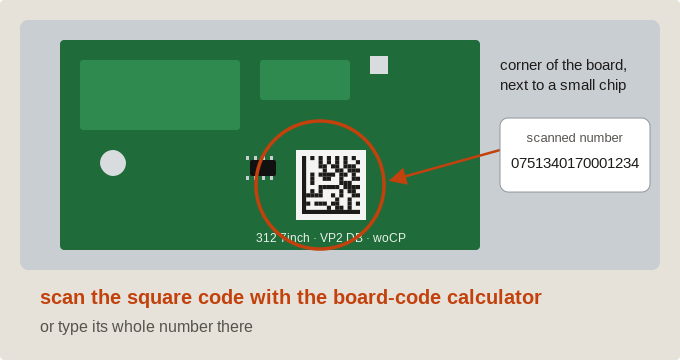
Drawing of the inside of a 7-inch Continental radio: the square code in the corner of the circuit board, next to a small chip – scan it with the board-code calculator
Where the square code is on the board (our drawing, number made up): scan it with the camera button of the board-code calculator.

If you typed the serial in the box above, choose Small label – 7in EMEA when you are asked what your label says.

Getting to the label

The label is on the radio case, so the radio usually has to come out of the dashboard. Most Fiat radios are held by spring clips and come out with a pair of release keys; touchscreen units are held by screws behind the trim panel. Before you start, look in the car’s documents for a radio code card – the code may already be there (the Fiat CODE card is for the immobilizer, not for the radio).
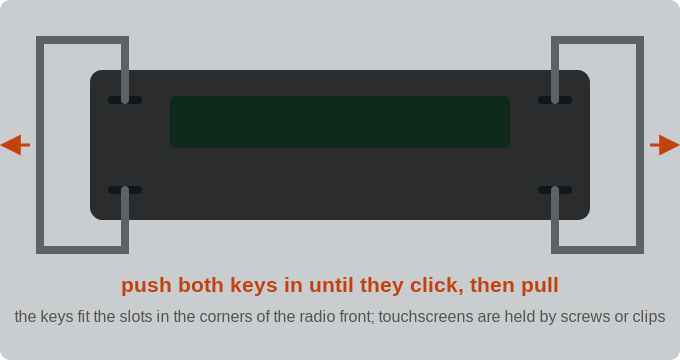
Drawing: two U-shaped radio removal keys pushed into the slots on both sides of the radio front, then the radio is pulled out
Two removal keys go into the slots on the radio front until they click; then pull the radio out by the keys (our drawing).

Entering the code

The radio asks for the code on its screen – Enter Anti-Theft Code or Please enter Anti-Theft Code – with four digit boxes.

  1. Switch the radio on with the ignition on.
  2. Enter the four digits on the screen: on the 5-inch touchscreen tap them on the keypad; on radios with a smaller screen set each box in turn.
  3. Confirm with OK. On the touchscreen radio the radio starts as soon as the fourth digit is entered.
  4. Enter the code once, carefully. After 3 wrong codes the radio shows Incorrect Code. Radio locked. Please wait 30 minutes (or Code Error – Please wait…) – leave it switched on with the ignition on until it asks again (locked radio).

On radios made in the Czech Republic the code uses only the digits 1 to 9 – a code with a 0 in it is a sign that the wrong serial or calculator was used.

More detail by brand: how to enter a radio code. Other Fiat radios (Blaupunkt, Daiichi, pre-code) are on the Fiat page.

Frequently asked questions

How do I know if my Fiat radio is a VP1 or VP2?

The label on the radio case names the maker (Continental or VDO) and the model, e.g. Fiat 312 VP1 or Fiat 250 VP2. For the code, what matters is where the radio was made: Made in Czech Republic, Assembled in Mexico or Made in Hungary. Type the whole serial above – an A3C… serial is recognised as made in Hungary; for an A2C… serial you are asked what your label says, because the three are calculated differently.

Which number do I type?

The long serial under CONTINENTAL, starting with A2C or, on radios made in Hungary, A3C (e.g. A2C1234567890001234) – type it whole, exactly as printed. Not the part number (FGA PN) and not the short 5-digit S/N in the MOPAR box: that one is not used for the code. On the Ducato 8.4-inch radio (Model: VP2RFP) type the S/N that starts with TF.

Can I scan the label with my phone?

Yes. Tap the camera button in the box above and hold the phone over the label – the A2C… serial is read and put into the box for you to check before you get the code.

The radio rejected the code. What now?

Do not try again straight away: wait until the radio accepts input again, then check that you typed the A2C… serial (not the S/N in the MOPAR box) and what the label says about where the radio was made. See locked radio help.