1. Home
  2. Radio code calculator
  3. Honda

Honda radio code

To get a Honda radio code, type the serial from the radio label or display – Honda's own radios (8 digits, U1234L1234 or a 6-digit Gathers serial) as well as Blaupunkt (BP…) and Philips (HO…) radios. The code is shown instantly.

Updated · Reviewed by the GetRadioCode team

Find your radio code

Free · instant · no sign-up
Where do I find my serial number?
  • Ford: M123456 · V123456
  • Blaupunkt / Bosch: BP3305A1234567 · CM6697X1234567
  • Renault / Dacia: pre-code such as A123 (hold 1 + 6 at switch-on)
  • Chrysler / Jeep: TM9205901394 · T00BE123456789
  • Mercedes Audio 10: AL2910X1202553
  • Toyota / Lexus: 16-character ERC shown on the screen

It is printed on a label on the radio case; some radios show it on the display. Typical serials: Step-by-step guide →

Your code ————

We recognise the radio and its brand from the serial and find the right code for you.

Know your radio type? Choose it from the list →

Free – up to 5 different serials every 24 hours. Only for a radio you own; check the serial before entering the code.

Which part of the serial to enter

Blaupunkt-made Honda radio (instant) Serial BP2030A1234567 → enter BP2030A1234567
Philips-made Honda radio (instant) Serial HO681AX1234567 → enter HO681AX1234567
Honda radio – 8 digits on the label or display (instant) Serial S/N 22001739 → enter 22001739
Honda U&L radio (instant) Serial U1234L1234 → enter U1234L1234

How to enter the Honda radio code

  1. Turn the ignition on and switch the radio on – the display shows CODE (newer models: ENTER CODE).
  2. On some newer Honda models, first try holding the power button for about 2 seconds – sometimes the radio unlocks by itself.
  3. Otherwise type the 5-digit code with the preset buttons, one digit at a time: the number on each button is the digit. Honda codes only use the digits 1–6.
  4. After the last digit the radio starts playing – there is no confirm button. On units with navigation, enter the navigation code on the screen when it asks for it.
  5. U&L radios (two codes shown): try code 1 first; if the radio shows CODE again, enter code 2.

A wrong code brings back CODE (on some radios ERR or E). After 10 wrong codes the radio stops taking codes: leave the ignition and the radio on for about an hour, until it asks for the code again, then enter the right code once (locked radio help).

Philips-made Honda radios (serial HO…):

  1. The display shows C. Press preset 1 – a dash appears.
  2. Set the first digit with the tuning button, then press preset 1 to enter it.
  3. Do the same for the other three digits.
  4. Press preset 1 once more. Two beeps – the radio plays.

If the display shows err, do not switch the radio off: wait until it asks for the code again and start once more. After several wrong codes the radio blocks entry for up to two hours – see locked radio help.

Where to find the serial

On a label on the radio case. Philips-made Honda radios show a 14-character serial starting with HO, Blaupunkt-made ones a serial starting with BP. Look for the radio code card in the owner’s wallet first – the code may already be on it.
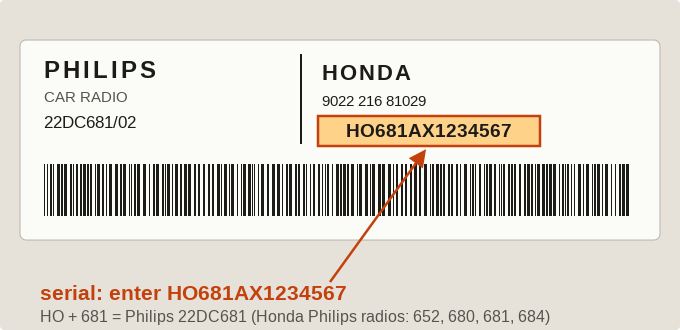
Drawing of the label of a Philips 22DC681/02 radio made for Honda: the serial HO681AX1234567 is under HONDA
Label of a Philips radio made for Honda (our drawing, numbers made up). Type all 14 characters starting with HO.

On many newer Honda radios the serial can also be shown on the display: with the ignition on, switch the radio off, hold presets 1 and 6 and switch it on again. Full walkthrough: how to find your radio serial number.
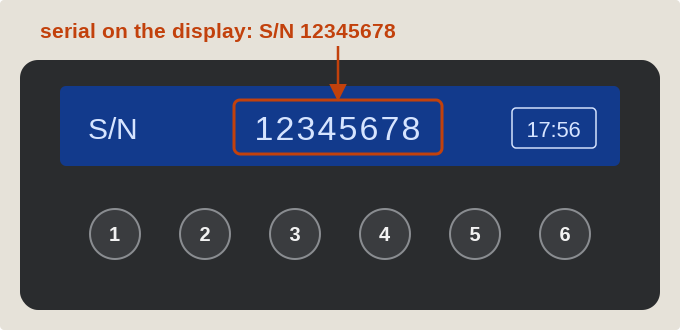
Drawing of a Honda radio display showing the serial: S/N 12345678
On many Honda radios the serial appears on the display after S/N – here 12345678 (our drawing). Type the 8 digits in the form above.

Which Honda radios are covered

  • Blaupunkt-made Honda radios – BP + 4 digits + 1 character + 7 digits: code shown instantly in the form above.
  • Philips-made Honda radios – HO + 3 digits + 2 letters + 7 digits (Philips 22DC652, 22DC680, 22DC681, 22DC684): code shown instantly in the form above.
  • Honda radios with an 8-digit serial (e.g. 22001739, on the label or the display after S/N): code shown instantly – for a radio with navigation, the navigation code too.
  • Honda navigation units with a 3-letter prefix (e.g. ABC28062866): type all 11 characters – the radio code and the navigation code are both shown.
  • Honda U&L radios – serial like U1234L1234: two possible codes shown instantly – try code 1 first.
  • Gathers radios – 6 digits starting with 5, 6 or 7: code shown instantly.
  • 8-digit serials starting with 4: not shown. For these the serial gives about 15 possible codes, and they usually do not work – look for the code card, or ask a Honda dealer.
  • Blaupunkt models recognised from the BP… serial, for example: 200R, SN7 A, SN7 B.

Type the full serial in the form above: we recognise which of these you have and show the code. If no code is found, our team can help.

Frequently asked questions

Which Honda radios get an instant code?

Honda's own radios – an 8-digit serial, a U&L serial such as U1234L1234, or a 6-digit Gathers serial – and the radios made by Blaupunkt (14 characters starting with BP) and Philips (14 characters starting with HO, e.g. the Philips 22DC681/02). Type the serial in the form above.

My Honda serial starts with HO.

That is a radio made by Philips for Honda. The three digits after HO are the Philips model – 652, 680, 681 or 684. Type all 14 characters and the code is shown instantly.

My Honda serial looks like U1234L1234 – why do I get two codes?

U&L radios have two possible codes. Try code 1 first; if the radio does not accept it, try code 2. Type the serial as printed, with or without the letters U and L.

Why do I get a radio code and a navigation code?

Honda units with navigation have two codes from the same serial: the radio code for the radio and a 4-digit code for the navigation system. Enter each one when it is asked for. For some units only the navigation code is shown.

My Honda serial starts with 4 – why is no code shown?

For radios with an 8-digit serial starting with 4 the serial gives about 15 possible codes, and they usually do not work. We do not show them, so you do not waste tries and lock the radio. Look for the anti-theft code card in the owner's manual pouch or a code sticker in the glovebox; otherwise a Honda dealer can find the code from the serial and the VIN, with proof of ownership.

My Gathers radio has only a 6-digit serial.

That is normal for Gathers radios made for Honda (6 digits, starting with 5, 6 or 7). Type the 6 digits – the code is calculated from them.

Can I get my Honda radio code from the VIN?

Not here – the code is found from the radio serial. In the USA Honda offers a radio code lookup with the VIN and the radio serial; elsewhere a Honda dealer can often find it, with proof of ownership.

Where is the serial on a Honda radio?

On a label on the radio case. On many newer Honda radios it can also be shown on the display: with the ignition on, switch the radio off, hold preset buttons 1 and 6 and switch it on again.

How do I enter the code on a Philips Honda radio?

The display shows C. Press preset 1 – a dash appears – then set the first digit with the tuning button and press preset 1 to enter it. Do the same for the other digits and press preset 1 once more: two beeps and the radio plays.