How to enter the Nissan radio code
When the radio shows CODE:
- Press preset 1 until the display shows the first digit of the code. Watch the display, do not count presses – on many radios the first press shows 0.
- Do the same with 2, 3 and 4 for the other digits.
- Confirm with TA. If nothing happens, try 6 and then TA, or the tune ▶ button. Owners on the Micra forum lost most time on this step: the code was right, the confirm button was not.
More: how to enter a radio code.
Waiting time on the display? Wrong codes block the radio for a while. Leave it switched on until it asks for the code again, then enter it once (locked radio help).
Where to find the serial
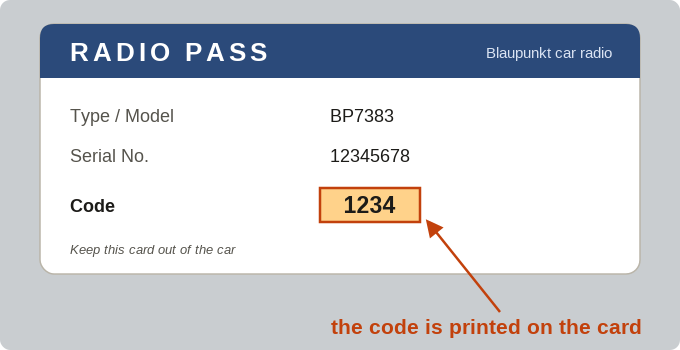
Before you take the radio out, look for the radio pass card in the service book – the code is already printed on it.
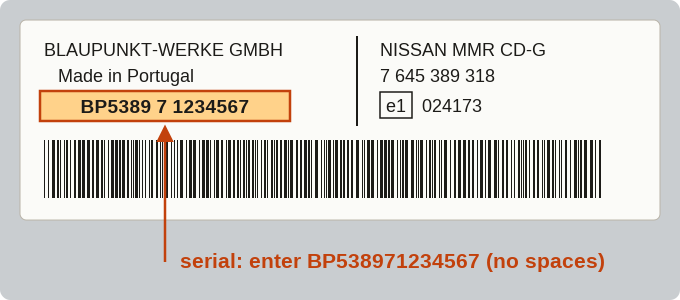
No card? The serial is on the label on the radio case – 14 characters starting with BP (Blaupunkt). It is often printed in three groups, e.g. BP5389 7 1234567: type it without the spaces. Full walkthrough: how to find your radio serial number.
Which Nissan radios are covered
- Blaupunkt-made Nissan radios – serial BP + 4 digits + 1 character + 7 digits.
- Other suppliers (for example many newer touchscreen units) – not covered automatically; our team can help.
- Blaupunkt models recognised from the BP… serial, for example: ET RH, Low RHD, Micra CD-J, Micra CD-K, Mid RHD, MM CD-K, MMR CD-G, MMR CD-S, MMR CD-T, MMR IDC-G, MMR IDC-S, MMR IDC-T, Mod C, PSA RNS4, Travelpilot RNS3.