Get the pre-code from the Master radio
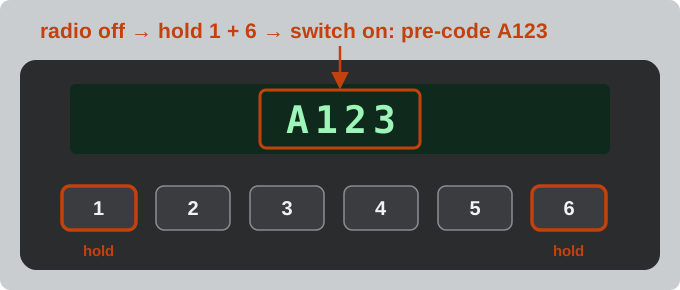
- Switch the radio off.
- Press and hold preset buttons 1 and 6 at the same time.
- While still holding them, switch the radio on.
- After a few seconds the display shows the pre-code, e.g. A123. Type only the letter and the three digits in the box above.
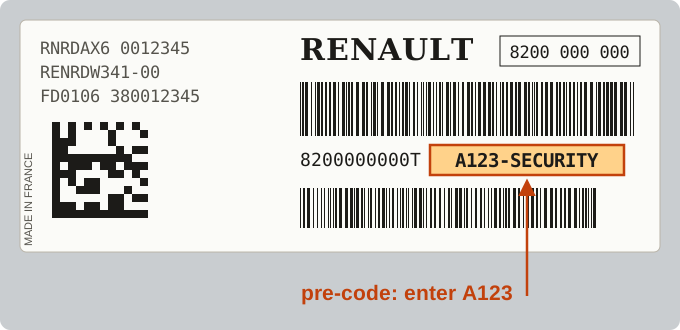
If the display stays on CODE or 0000, read the pre-code from the label on the radio case. It is printed as A123-SECURITY (often called the security code) or, on some newer van radios, at the end of the long number under the barcode – for example …RT A123. You need two radio removal keys to slide the radio out. On a phone you can tap the camera button and point it at the display or the label.
Which Master radios are covered
- Master II (1998–2010) with the standard Renault radio (Update List, Tuner List, CD Player) – pre-code, instant code above.
- Master III (2010–2019) with a radio that shows a pre-code or has one on its label – instant code above.
- Older radios made by Blaupunkt or Philips – type the full serial from the label (BP… or RN…, 14 characters); it is recognised automatically.
- Radios without a pre-code, touchscreens (Media-Nav, R-Link) and the radios of the newest Master – send the VIN with the request form and our team emails you the code, with the price first.
The VIN is on the plate in the door frame, at the bottom of the windscreen and in the registration document – 17 characters, starting with VF.
Enter the code
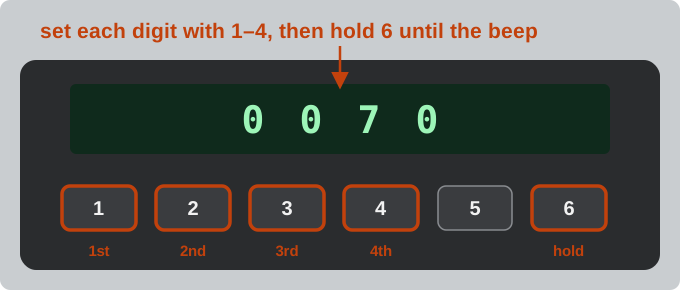
- Switch the radio on – the display shows CODE or 0000.
- Press 1 until the first digit is right, then 2, 3 and 4.
- Press and hold 6 until you hear a beep.
On a radio without number buttons, turn the thumb wheel of the remote control on the steering column to set each digit, press its button to go to the next digit, and hold it to confirm the code.
After several wrong codes the radio makes you wait longer before the next try – see what to do when a radio is locked. The Renault Trafic uses the same radios; more about pre-codes is on the Renault radio code page.