Where to find the pre-code
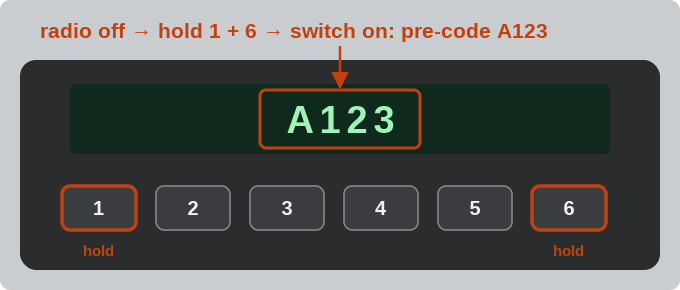
- On the screen (most radios, no tools needed): switch the radio off, press and hold buttons 1 and 6, switch it on while still holding them. After a few seconds the screen shows PRE CODE A123 – type the letter and three digits above.
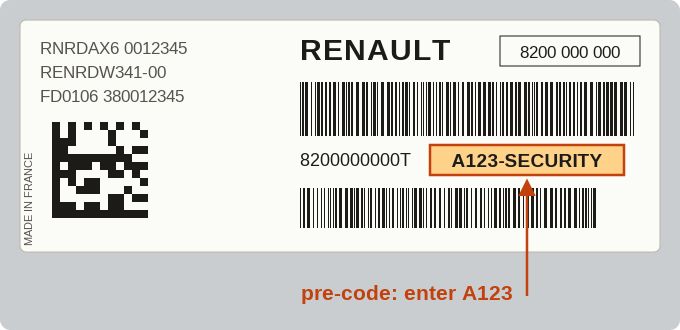
- On the label (if the screen stays on CODE or 0000): the pre-code is printed on the label on the radio case, next to the word SECURITY (e.g. A123-SECURITY). The label is only visible with the radio out – slide it out with two radio removal keys.
Example
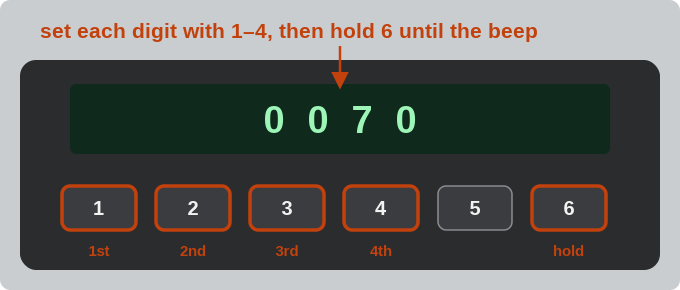
A radio showing the pre-code A100 has the code 0070. Enter it by pressing button 1 until the first digit reads 0, button 2 for the second digit (0), 3 for the third (7) and 4 for the fourth (0), then hold 6 until the radio beeps.
Radio with a remote control behind the steering wheel? Turn the wheel on the remote to set the first digit, then press the button on the bottom of the remote to confirm it. Set the other three digits the same way, then press and hold that button until you hear a beep.
Radios this works for
Renault and Dacia radios that show a pre-code, such as the Update List and Tuner List families fitted from the late 1990s to the mid-2010s. Media-Nav has no pre-code – order the code by VIN; for R-Link and Carminat navigation systems, send us the details.