1. Home
  2. Radio code calculator
  3. Ford
  4. Ford Ka

Ford Ka radio code

Type the serial of your Ford Ka radio – on most Ka radios M followed by 6 digits, e.g. M123456 – and get the 4-digit radio code instantly. Free, no sign-up.

Updated · Reviewed by the GetRadioCode team

Find your radio code

Free · instant · no sign-up
Where do I find my serial number?
  • Ford: M123456 · V123456
  • Blaupunkt / Bosch: BP3305A1234567 · CM6697X1234567
  • Renault / Dacia: pre-code such as A123 (hold 1 + 6 at switch-on)
  • Chrysler / Jeep: TM9205901394 · T00BE123456789
  • Mercedes Audio 10: AL2910X1202553
  • Toyota / Lexus: 16-character ERC shown on the screen

It is printed on a label on the radio case; some radios show it on the display. Typical serials: Step-by-step guide →

Your code ————

We recognise the radio and its brand from the serial and find the right code for you.

Free – up to 5 different serials every 24 hours. Only for a radio you own; check the serial before entering the code.

Choose your radio type yourself

Ford Ka radio codes

Free · instant · no sign-up
Your code ————

Enter the 6 digits that follow the letter M on the radio label M123456 → 123456.

Calculated on our server

Free – up to 5 different serials every 24 hours. Only for a radio you own; check the serial before entering the code.

What the serial looks like

  • Ford Ka radio labelM123456

Type the whole serial as printed – the radio type is recognised automatically.

Which Ford Ka radios are covered

Ka Usual factory radio Serial How to see it
Ka Mk1 (1996–2008) 2000 / 3000 / 4000 RDS cassette M + 6 digits Label on the radio case
Ka Mk1 (1996–2008) 4500 RDS EON cassette M + 6 digits Buttons 2 + 6 at switch-on, or the label
Ka Mk1 (later cars) 6000 CD M or V + 6 digits Buttons 1 + 6 at switch-on, or the label
Ka Mk2 (2008–2016) Fiat-platform radio Different format Label on the radio case

Type the serial exactly as printed – the letter included – and the right method is chosen for you. For a Ka Mk2 radio that is not recognised, send us the serial; Fiat radio labels are explained on the Fiat radio code page.

How to enter the code on a Ford Ka

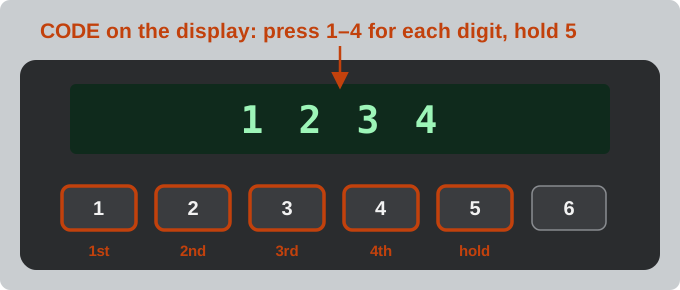
  1. Switch the radio on – it shows CODE or KEYCODE.
  2. Press preset 1 until the first digit is right, then 2, 3 and 4 for the other digits.
  3. Hold 5 to confirm.
Drawing: entering the code on a Ford radio – buttons 1 to 4 set the four digits, then hold button 5
Buttons 1–4 set the four digits, a long press on 5 confirms (our drawing).

If the radio shows WAIT or LOCKED, stop and read what to do when a radio is locked before the next try.

Frequently asked questions

Where is the serial on a Ford Ka radio?

On the 4500 RDS cassette radio, hold buttons 2 and 6 while switching the radio on; on the 6000 CD, hold 1 and 6. The serial (M… or V…) appears on the display. Older cassette radios do not show it – take the radio out and read the label on the case.

My Ka is a 2009–2016 model. Does it use the same code?

The second Ka was built together with the Fiat 500 and has a different radio from the first Ka. Type the whole serial from its label: if it is recognised, the code is shown; if not, send the serial to our team.

I typed only the 6 digits. Is that enough?

Type the letter too (M123456). If you type only the digits, you are asked which letter is in front of them on the label, because M and V radios use different methods.