1. Home
  2. Radio code calculator
  3. Ford
  4. Ford M Series

Ford M series radio code

If your Ford radio serial starts with the letter M followed by 6 digits (for example M123456), type it below as printed – longer labels such as FDC2005M123456 work too. The 4-digit code is calculated instantly.

Updated · Reviewed by the GetRadioCode team

Find your radio code

Free · instant · no sign-up
Where do I find my serial number?
  • Ford: M123456 · V123456
  • Blaupunkt / Bosch: BP3305A1234567 · CM6697X1234567
  • Renault / Dacia: pre-code such as A123 (hold 1 + 6 at switch-on)
  • Chrysler / Jeep: TM9205901394 · T00BE123456789
  • Mercedes Audio 10: AL2910X1202553
  • Toyota / Lexus: 16-character ERC shown on the screen

It is printed on a label on the radio case; some radios show it on the display. Typical serials: Step-by-step guide →

Your code ————

We recognise the radio and its brand from the serial and find the right code for you.

Free – up to 5 different serials every 24 hours. Only for a radio you own; check the serial before entering the code.

Choose your radio type yourself

Ford M Series radio codes

Free · instant · no sign-up

Type the serial from the label: M and 6 digits (M123456).

Your code ————

Free – up to 5 different serials every 24 hours. Only for a radio you own; check the serial before entering the code.

What the serial looks like

  • Ford M series labelM123456
  • Ford M (longer label)FDC2005M123456

Type the whole serial as printed – the radio type is recognised automatically.

Step by step

  1. Read the serial on the white label on the radio case – it looks like M123456. Some labels print it inside a longer number, e.g. FDC2005M123456 – you can type it as printed.
  2. Type the serial in the box above as printed, e.g. M123456 or FDC2005M123456 – or scan the label with your phone camera.
  3. Enter the code: preset 1 sets the first digit, 2 the second, 3 the third, 4 the fourth (each press adds one: 0, 1 … 9); check all four, then press 5 – if nothing happens, hold it for 2–3 seconds. A beep means the code is accepted.
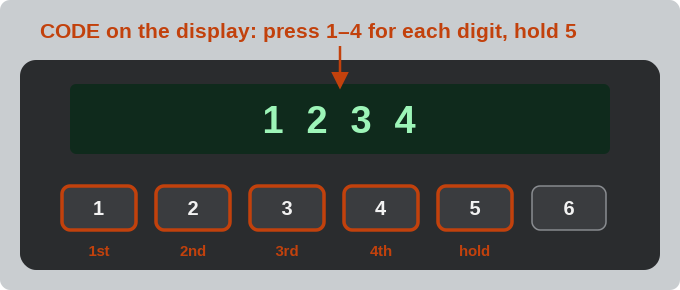
Drawing: entering the code on a Ford radio – buttons 1 to 4 set the four digits, then hold button 5
Buttons 1–4 set the four digits, a long press on 5 confirms (our drawing).

M or V?

The first letter of the serial decides the calculator. M series codes are calculated with a formula; V series codes are looked up in our database. If your serial starts with another letter, see the table on the Ford page.

Frequently asked questions

My serial is M123456 – what do I type?

Type it exactly like that: M123456. If you type only the 6 digits, the site asks which letter is in front of them – choose M.

Which Ford radios use M serials?

M serials are found on many Ford radios and cassette/CD units made up to the mid-2000s, fitted to models such as the Fiesta, Focus, Mondeo, Ka, Transit and Galaxy. The letter on the label is what matters, not the car model.

The display shows LOCKED. Can I still use the code?

WAIT or a countdown clears by itself: leave the radio and ignition on until CODE comes back, then enter the code once. LOCKED 10 (ten wrong codes) does not: on many Ford radios, hold button 6 while switching the radio on to get three more tries – use them only with this code.