1. Home
  2. Radio code calculator
  3. Ford
  4. Ford V Series

Ford V series radio code

Ford V series codes cannot be calculated with a formula, so we look them up in our database. Type the serial as it is printed – V123456, or the longer Sony number such as SOCD6X7V123456 – and the code appears in a second.

Updated · Reviewed by the GetRadioCode team

Find your radio code

Free · instant · no sign-up
Where do I find my serial number?
  • Ford: M123456 · V123456
  • Blaupunkt / Bosch: BP3305A1234567 · CM6697X1234567
  • Renault / Dacia: pre-code such as A123 (hold 1 + 6 at switch-on)
  • Chrysler / Jeep: TM9205901394 · T00BE123456789
  • Mercedes Audio 10: AL2910X1202553
  • Toyota / Lexus: 16-character ERC shown on the screen

It is printed on a label on the radio case; some radios show it on the display. Typical serials: Step-by-step guide →

Your code ————

We recognise the radio and its brand from the serial and find the right code for you.

Free – up to 5 different serials every 24 hours. Only for a radio you own; check the serial before entering the code.

Choose your radio type yourself

Ford V Series radio codes

Free · instant · no sign-up

Type the serial from the label: V and 6 digits (V123456).

Your code ————

Free – up to 5 different serials every 24 hours. Only for a radio you own; check the serial before entering the code.

What the serial looks like

  • Ford V series labelV123456
  • Ford Sony (longer label)SOCD6X7V123456

Type the whole serial as printed – the radio type is recognised automatically.

Step by step

  1. Get the serial: hold 1 + 6 while switching the radio on, or read the label – it looks like V123456. Sony radios may print it as SOCD6X7V123456 – you can type it as printed.
  2. Type the serial in the box above as printed, e.g. V123456 or SOCD6X7V123456 – or scan the label or display with your phone camera.
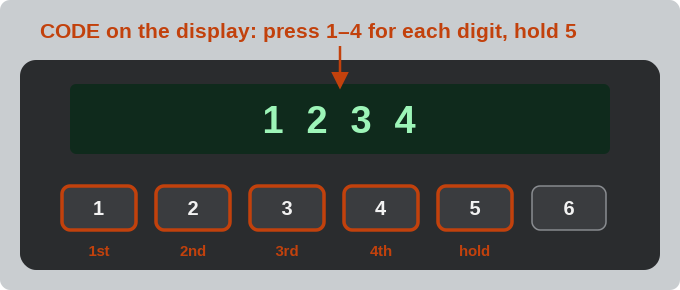
  3. Enter the code with presets 1–4 and confirm with 5.
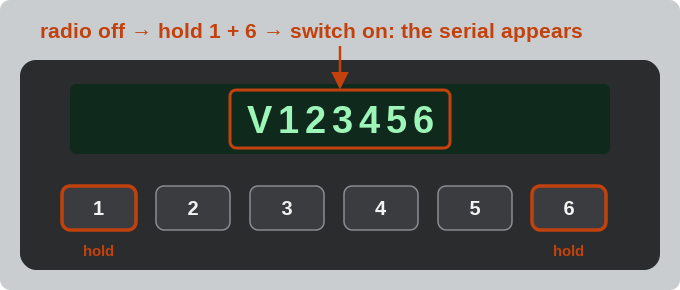
Drawing of a Ford radio showing its serial V123456 on the display after holding buttons 1 and 6 at switch-on
Radio off, hold 1 and 6, switch on: the serial appears on the display (our drawing).
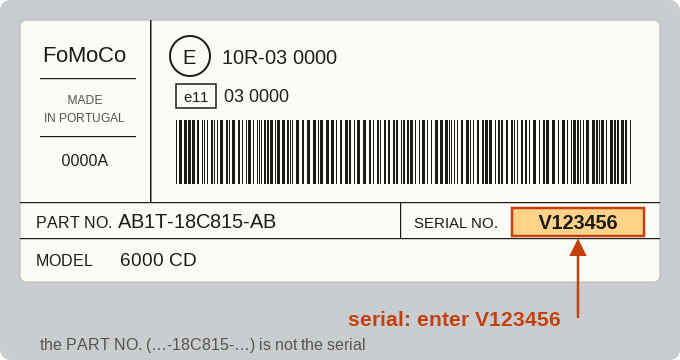
Drawing of a Ford radio label: the serial is printed after SERIAL NO., e.g. V123456; the PART NO. is not the serial
Where the serial is on a Ford radio label (our drawing, numbers made up). Enter the V and the 6 digits, here V123456.
Drawing: entering the code on a Ford radio – buttons 1 to 4 set the four digits, then hold button 5
Buttons 1–4 set the four digits, a long press on 5 confirms (our drawing).

V series radios include the widely used Ford 6000 CD and many units fitted from the mid-2000s. For M serials use the M series calculator.

Frequently asked questions

How do I show the V serial on the display?

On many V series radios (such as the 6000 CD): switch the radio off, press and hold buttons 1 and 6, then switch it on. The serial appears on the display.

Is the V series lookup really free?

Yes. The lookup is free and needs no account.

My Travelpilot serial starts with C7E3F07 or C7E3F09.

Those are Travelpilot navigation radios, not V series. Use the Ford Travelpilot page – or type the full serial on the Ford page and the radio is recognised automatically.