1. Home
  2. Car radio code guides
  3. Why the radio asks for a code after a battery change

Why the radio asks for a code after a battery change

The radio's anti-theft system treats any loss of power as a possible theft, so after a flat battery, a battery change or electrical work it asks for its code before it plays again. Find the serial, get the code from our calculators, and enter it once.

Updated · Reviewed by the GetRadioCode team

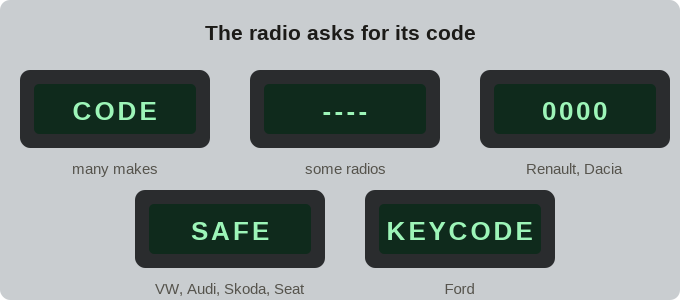
Drawing of radio displays asking for the code: CODE, four dashes, 0000, SAFE and KEYCODE
What a radio shows when it wants its code (our drawing).

What to do now

  1. Look for the code card in the owner’s wallet or service book.
  2. Find the serial number – see how to find your radio serial.
  3. Get the code from the calculator for your brand.
  4. Enter it once, carefully – see how to enter a radio code.

Avoid it next time

  • Use a memory saver when changing the battery.
  • Write the code in the owner’s manual or keep a photo of the radio label on your phone.
  • Tell the garage the code (or where to find it) when you leave the car for battery or electrical work.

Frequently asked questions

Can I change the battery without losing the radio code?

Yes, with a memory saver – a small device that keeps power on the car's electrics through the OBD port or the cigarette lighter socket while the battery is out. Garages use them routinely.

Will jump-starting the car lock the radio?

Normally not, as long as the battery is not disconnected. If the voltage dropped very low, the radio may still ask for the code.