Why the radio asks for a code
Car makers and radio suppliers introduced anti-theft codes in the 1980s and 1990s, when radios were a common target for thieves. The radio stores a secret number linked to its serial. As long as it has power, it plays normally. When the power supply is cut – the radio is removed, the battery goes flat or is disconnected, a fuse is pulled – the radio asks for the code the next time it is switched on. Without the correct code it will not play, so a stolen radio has little value.
In everyday life this means the code usually turns up after a battery change, a jump start that went wrong or work on the electrics, often years after the code card went missing.
How the code is linked to the serial
Every protected radio has a unique serial number, printed on a label on the radio case and, on many radios, shown on the display. The maker usually links each serial to a code in one of two ways:
- With a formula. The code is calculated from the serial. These radios – for example Ford M series, Renault pre-code and many Blaupunkt and Becker units – can be decoded with a calculator.
- With a list. The code was chosen when the radio was built and stored in a list. These codes – for example Ford V series or Grundig – can only be found by looking the serial up in a database.
Either way, the code belongs to the radio, not to the car: a radio moved to another car keeps its code.
Types of radio codes
What you type and what you get depends on the make:
- 4- or 5-digit codes – the most common kind. You enter the digits with the preset buttons 1–4 (or 1–5) and confirm.
- Ford keycode – Ford’s name for its 4-digit code. The serial starts with M or V followed by 6 digits and many Ford radios show it on the display when you hold buttons 1 and 6 at switch-on. See the Ford radio code page.
- Renault pre-code – Renault and Dacia radios show a short pre-code, one letter and three digits such as A123, which is turned into the 4-digit code. See the Renault radio code page.
- Toyota ERC – many Toyota and Lexus units show a 16-character ERC code on the screen when they lock; the 8-character unlock code is worked out from it. See the Toyota ERC page.
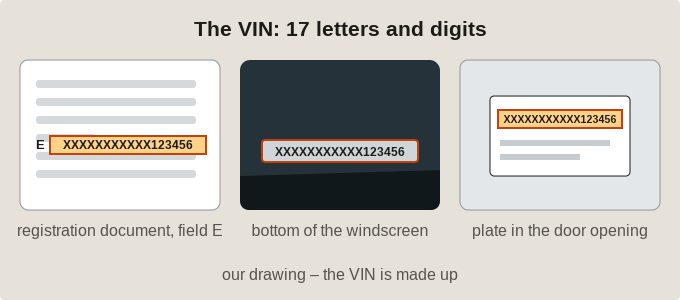
- Codes found by VIN – for some newer radios the code is looked up from the car’s VIN (17 characters) rather than from a serial on a label. This needs a dealer or a lookup service.
Where to find your radio code
- The code card. Most cars came with a small card or sticker showing the code – check the owner’s manual wallet, the service book and the glovebox. Some owners wrote the code inside the manual.
- A radio code finder or calculator. Type the serial from the radio label into our radio code finder – for the radios we cover, the code is shown free and instantly. You can also scan the label or the display with your phone camera.
- A dealer. A dealer of your car’s brand can usually find the code from the serial or the VIN, normally with proof of ownership and often for a fee.
- Our request form. If your radio is not covered instantly, send us the details and our team looks the code up and replies by email, with the price first.
To find the serial itself, see where to find the radio serial number. On many radios you can show it on the display without removing the radio.
Entering the code
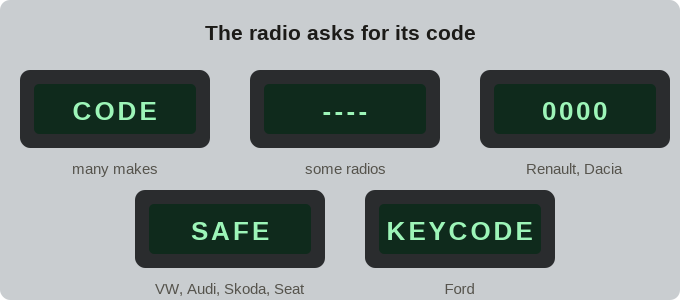
On most radios you switch the radio on, wait for CODE (or ––, 0000, SAFE) on the display, set each digit with the preset buttons and confirm with a longer press. The details differ by make – see how to enter a radio code.
Wrong code and lockout
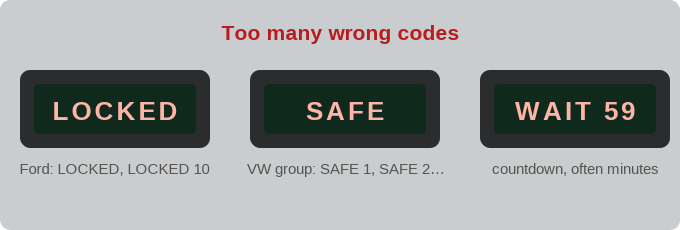
Every wrong code counts. After a few attempts most radios block code entry and show LOCKED, SAFE, WAIT or a countdown, and the waiting time often grows with every new mistake. Leave the radio and the ignition switched on until it asks for the code again, then enter the correct code once, carefully. Guessing makes it worse – read radio locked after too many attempts before you try again.
Newer radios without a code
Many radios and touchscreens from the last ten to fifteen years no longer ask for a code. Instead they are paired to the car electronically: the radio only works in the car it was fitted to, and moving it to another car needs a dealer or a specialist with diagnostic equipment. A code does not help with these units. If your radio shows a message like “radio locked” or “theft protection” and no code prompt, check the owner’s manual or ask a dealer.
Free or paid?
For many common radios the code can be calculated or looked up instantly, and there is no reason to pay for it. Services that charge for every code are useful for rare radios, but compare first – read free radio code vs paid services.