Get the pre-code from the Clio radio
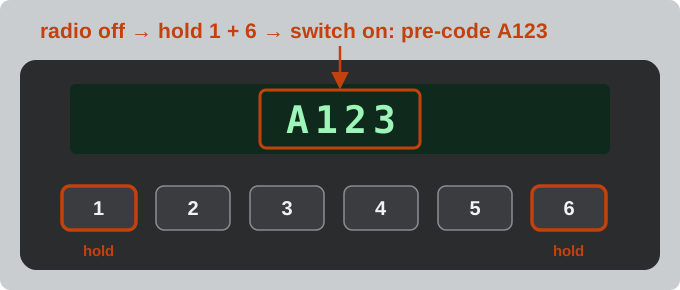
- Switch the radio off.
- Press and hold preset buttons 1 and 6 at the same time.
- While still holding them, switch the radio on.
- After a few seconds the display shows the pre-code, e.g. A123. Type only the letter and the three digits in the box above.
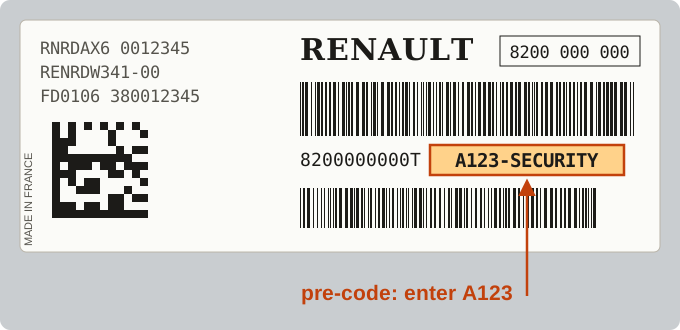
If the display stays on CODE or 0000, read the pre-code from the label on the radio case, where it is printed as A123-SECURITY (often called the security code) – you need two radio removal keys to slide the radio out. On a phone you can tap the camera button and point it at the display or the label.
Which Clio radios are covered
- Clio II and Clio III with the standard Renault radio (Update List, Tuner List, CD Player) – pre-code, instant code above.
- Older Clio radios made by Blaupunkt or Philips – type the full serial from the label (BP… or RN…, 14 characters); it is recognised automatically.
- Newer Clio radios without a pre-code (for example units made by LG) – send the VIN with the request form and our team emails you the code, with the price first.
- Media-Nav, R-Link and other touchscreens – no pre-code; send us the details.
Enter the code
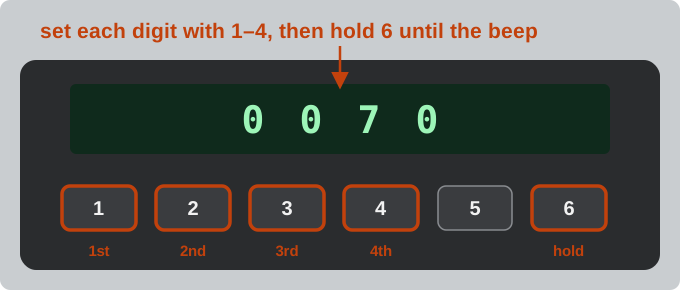
- Switch the radio on – the display shows CODE or 0000.
- Press 1 until the first digit is right, then 2, 3 and 4.
- Press and hold 6 until you hear a beep.
After several wrong codes the radio makes you wait longer before the next try – see what to do when a radio is locked. More about pre-codes and other Renault radios is on the Renault radio code page.