Volkswagen radio code — 14.99 €
Your Volkswagen radio code, usually within a few hours
Type the serial, pay 14.99 € once, and our team emails you the code for your exact Volkswagen radio – usually within a few hours (max. 24 h). 100% money back if there is no code.
- Usually within a few hours, max. 24 h
- Money back if there is no code
- Secure online payment
- Real people answer you
Why is it not free? Your serial is not in our free lists, so we get the code for your exact radio from our supplier.
Online payment is being set up. Please use the request form for now. Open the request form
How it works
- 1Type the serial
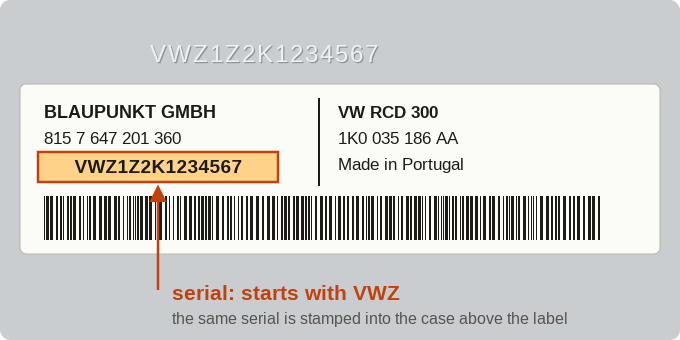
14 characters from the radio’s label, starting with VWZ, AUZ, SEZ or SKZ.
- 2Pay securely
On the payment provider’s own secure page – we never see your card details.
- 3Get the code by email
Within 24 hours, usually sooner. It also shows on your order page, with how to enter it.
Our guarantee
If we cannot get the code for your serial, or the code and a second code do not work (shown in a short video), you get 100% of your money back.
Typed a serial that is in our free list after all? You get the code right away, without paying.
Which Volkswagen radios
- VWZ serials – 14 characters on the radio’s label, for example VWZ1Z2D1234567. Radios: RCD 200, RCD 210, RCD 300, RCD 310, RCD 510, RNS 310, RNS 315, RNS 510 and the older Gamma, Beta and Alpha, in the Golf, Passat, Polo, Touran, Jetta, Caddy, Transporter and other models.
- Free first – most serials are in our free list: try the Volkswagen radio code page first. If your serial is there after all, this page gives you the code without payment.
- Not for component protection – if the display says “Component protection” / “Komponentenschutz”, a code does not unlock it.
Where is the serial?
On the label on the radio case – the radio has to come out of the dashboard (with two removal keys). Some cars also have a radio code card in the owner’s wallet: if the code is on it, you need nothing from us. See how to find the serial.
Frequently asked questions
How long does it take?
Up to 24 hours after the payment – usually less. The code comes by email and also shows on your order page. It is not instant, because the code is looked up for your exact serial.
How much does a Volkswagen radio code cost?
14.99 €, paid once. You see the price and the latest delivery time before you pay.
Which radios cannot be ordered?
Radios with component protection (the display says “Component protection” or “Komponentenschutz”) and the large touchscreen units (Discover Media, Composition, Amundsen, Columbus, MIB). They are not unlocked with a code but by a dealer or a workshop with an online diagnostic tester.
What if the code does not work?
Reply to the email with the code with a short video that shows the serial label, how you enter the code and what the radio shows. We check it and send a second code. If no code works, you get 100% of the price back. If we cannot get a code at all, you get 100% back too.
What if I typed the serial wrong?
That is why we ask for a photo of the label: with a photo we compare the serial before we look the code up and correct it if needed. Without a photo, a wrongly typed serial gives a wrong code that is not refunded.
How do I pay?
By card, Apple Pay or Google Pay (through Stripe), or with PayPal – always on their own secure page. We never see your card or payment details.